


ezCater - Food for Workplaces
4.639.00 Reviews
App Specs
- Version
- 1.10.5-140
- Updated On
- License
- Free
- Downloads
- 100,000+
- Developer
- ezCater
- Categories
- Food & Drink
- Platform
- Android
Screenshots
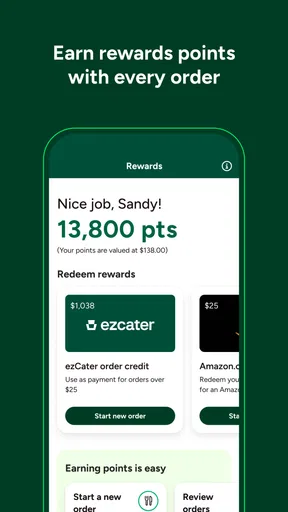
 Analysis by AppCompare
Ordering food for a team is less about choosing a dish than keeping the whole plan manageable: people have different tastes, the meeting has a fixed start time, and somebody still has to handle the receipt. That is the problem ezCater is meant to help with. I find it most useful when one person is responsible for feeding a group at work and wants a more organized alternative to calling restaurants one by one.
What free access means in practice
The app is free to download, so trying it does not require paying for the app itself. That is useful if you only coordinate a work lunch now and then: you can see whether it suits your routine without committing to a paid app. The food order is a separate decision, though. I would judge the value by the available meal options and the full order total shown when arranging a meal, rather than assuming that free access means the catering itself is free.
That distinction matters when you are ordering on a company budget. Before settling on a menu, I would check the complete cost and make sure it fits the amount your team has agreed to spend. The app’s free status removes one barrier to trying it, but it does not, by itself, make every restaurant or order a good-value choice.
Where the app can earn its place
For a recurring meeting, being able to revisit a previous order can save more time than browsing a long list of restaurants from scratch. I would use that convenience as a starting point, not as a reason to repeat an old order without checking it: attendance, dietary needs, and the meeting schedule can change. A familiar choice is especially handy when the team already knows what it likes and the organizer needs to spend less time rebuilding the same plan.
Ratings and reviews also help narrow the field, but I would treat them as one clue rather than a guarantee. A restaurant that worked well for one group may not match another group’s preferences. Looking at the menu and considering the mix of people eating is still part of the organizer’s job. The practical benefit is that these decisions sit alongside the ordering process instead of being scattered across separate calls and searches.
Trade-offs before you place an order
Group catering is naturally less flexible than everyone choosing their own lunch. A shared order can simplify a work event, but it asks the organizer to make choices on behalf of other people. I would collect dietary requirements and preferences before opening the app, then use those answers to guide the restaurant and menu search. That small step can prevent a last-minute scramble and makes filters more useful than simply picking whatever looks appealing.
Location also affects how worthwhile the experience is. The app’s options may feel more useful in a larger city, while someone in a rural area may have fewer nearby choices. If the available selection does not fit the group, a familiar local restaurant or another way of ordering may be the better option. For a small team with no need for coordinated catering, each person ordering lunch independently can also be simpler.
Worth Reading Before You Choose

EA SPORTS FC Mobile 26 Is a Bigger Football Game, but It Takes Time

Flipboard Shows What News Apps Must Do Beyond the Feed

Switching to Android Auto Means Rethinking Your Driving Routine

Google Calendar Makes a Crowded Week Easier to Manage

Ludo King Makes the Most of the Minutes Between Plans

Baby Panda World Brings Quick Play to Modern Phones, but Its Game Library Feels Busy
The app is developed by ezCater and sits in the food-and-drink category. It is free, has an Everyone content rating, and has reached more than 100,000 installs. Its average rating is 4.7 from 243 ratings, alongside 34 reviews. Those figures suggest that plenty of people have tried it, but they cannot tell me whether the restaurants available in your area suit your team; that depends on what you find when you search.
Who is likely to get the most value?
I would consider it for an office coordinator, an administrative assistant, or a team lead who regularly arranges meals for meetings. It is also a sensible option when the organizer wants a record of the order and receipt details for expense reporting. On the other hand, it is probably more process than a person needs for a one-off solo lunch. Its strongest case is group food at work, not replacing every restaurant-ordering habit.
One useful way to try it is to plan a modest, familiar team meal first. That lets you see whether the nearby choices, menu details, and ordering flow work for your workplace before relying on it for a larger or more time-sensitive event. If it does fit, a previous order may make the next similar occasion easier to organize; if it does not, you have learned that before making it part of your routine.
Version 1.9.3-132 supports devices running Android 8.0 or later, and the app was released on January 26, 2024. For iPhone users, it is also available on iOS. I would check device compatibility before planning to use it on an older phone, especially if the person responsible for ordering relies on that device during the workday.
In short, I see ezCater as a practical tool for coordinating workplace meals, rather than a universal food-ordering app. The free app is easy to try, and its value is clearest when group orders, repeat occasions, and expense paperwork are part of your routine. If you only need an individual meal, have very limited nearby options, or prefer to handle arrangements directly with a local restaurant, another approach may suit you better.
Have you ever been in a situation where you’re in charge of ordering food for the office, but the thought of coordinating everyone’s dietary needs and preferences sends you into a mild panic? I’ve been there, and let me tell you, it’s not fun. Enter ezCater – the app that promises to make ordering food for work as easy as pie. But does it really deliver? Let’s dig into it.
First Impressions and Setup
So, downloading ezCater was a breeze. Available on both Android and iOS, the app installs quickly and gets you started with minimal fuss. Once you’ve opened it, you’re greeted with a clean and intuitive interface that doesn’t overwhelm. That’s a big win in my book because nothing’s worse than an app that feels like it requires a manual to navigate.
Setting up an account is as straightforward as it gets. You can sign up with your email or use Google or Apple for a faster login. I chose to go the email route, and in less than two minutes, I was good to go. The app also asks for your location to better serve you with available caterers near you. It’s all pretty seamless.
Exploring the Features
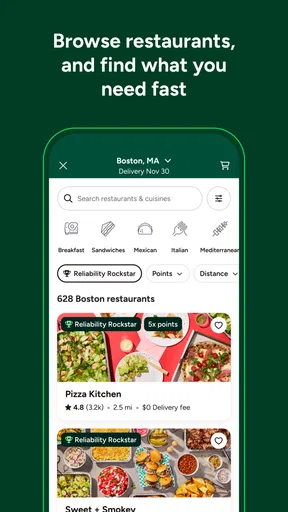
Once you’re in, the real magic of ezCater begins. The app houses a vast network of caterers, and it’s not just limited to the usual suspects. Whether you’re in the mood for sandwiches, sushi, or something entirely different, ezCater has you covered. The search function is robust; you can filter by cuisine type, dietary restrictions, and even budget, which is super handy.
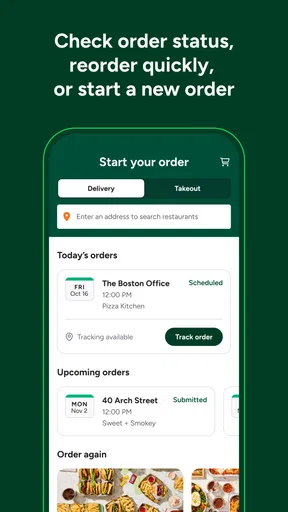
One feature I really appreciated was the ability to view customer ratings and reviews for each caterer. It’s like having a friend give you the lowdown before you commit. Another neat feature is the ability to reorder past meals with a single click. This is a lifesaver for recurring meetings or events where you know what works for the team.
Placing an Order
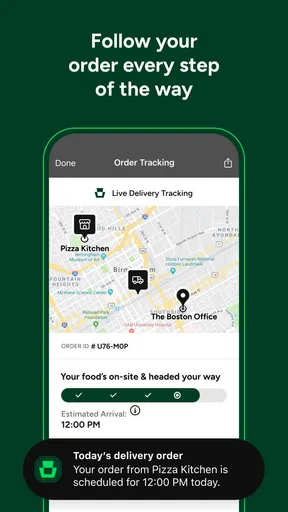
With a few clicks, I was able to put together a lunch order for the office. The app allows you to set delivery times, and I was pleasantly surprised by the accuracy and punctuality – the food arrived exactly when it was supposed to. The app also provides real-time tracking, so you know exactly when to expect your delivery.
Another bonus is the detailed invoice and receipt options, which make it easy for those of us who need to do expense reports. The payment process was straightforward, supporting multiple payment methods, which is always a plus in my book.
Overall Experience
Using ezCater was genuinely a stress-free experience. It’s clear that the app is designed with the user in mind, and it nails the balance between functionality and simplicity. From the variety of catering options to the ease of placing and tracking orders, it’s like having a personal assistant dedicated to food logistics.
If I had to nitpick, I'd say that while the app is fantastic for larger cities, it might not have the same extensive options in more rural areas. However, it’s evident that they’re continuously expanding their reach.
In conclusion, if you’re tasked with feeding a group at work, ezCater is an app that should definitely be on your radar. It takes the hassle out of catering, leaving you more time to focus on what really matters. So go ahead, give it a try, and make your next office meal a breeze.
Pros
- Easy to navigate interface.
- Wide variety of catering options.
- Real-time order tracking.
- Customizable dietary preferences.
- Reliable customer support.
Cons
- Limited delivery areas.
- Higher service fees.
- Occasional order mix-ups.
- Some vendors lack reviews.
- Requires account creation.
FAQs for ezCater - Food for Workplaces
What is ezCater and how does it work?
ezCater is an app designed to streamline food ordering for workplace events and meetings. It connects users with a vast network of local caterers, allowing for easy browsing, ordering, and management of catering services. Users can customize their orders, schedule deliveries, and track everything directly through the app, ensuring a seamless experience.
Can ezCater accommodate dietary restrictions and preferences?
Yes, ezCater provides options to cater to various dietary restrictions and preferences. Users can filter menus based on needs such as vegetarian, vegan, gluten-free, and more. The app also allows for special instructions during ordering, ensuring that all dietary requirements are communicated clearly to the caterers.
What are the payment options available on ezCater?
ezCater offers multiple payment options for user convenience. You can pay via credit card directly through the app, and some businesses may have the option to set up corporate accounts for easy billing. The app is designed to securely handle transactions, providing a hassle-free payment process.
Is there a minimum order requirement on ezCater?
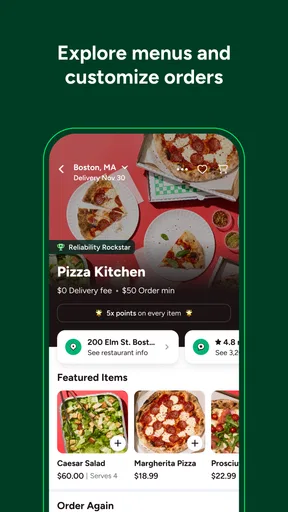
Minimum order requirements on ezCater vary depending on the caterer you choose. Each caterer sets their own minimum, which is clearly displayed on their menu page within the app. This allows users to plan and budget accordingly when placing their orders.
How reliable is the delivery service on ezCater?
ezCater partners with reputable local caterers and delivery services to ensure timely and reliable deliveries. Users can track their orders in real-time and receive notifications about the status of their deliveries. The app's rating and review system helps maintain high standards, ensuring satisfaction with both food quality and delivery service.


